Fund Treasury
Capture opening and closing balances per outlet for any day or month — even when outlets share one bank account.
Included for every partner — no extra subscription charge.
How this relates to Cashflow
| Cashflow | Fund Treasury | |
|---|---|---|
| Purpose | Record income & expenses | Record opening & closing cash balances |
| What you enter | Each sale, bill, rent, salary… | Start-of-period and end-of-period balance per outlet |
| Best for | Day-to-day money movement | Eagle-eye cash position by location |
| Subscription | Paid product | Free for all |
You should not re-enter the same in/out lines in Treasury. Keep movements in Cashflow. Use Treasury only for balances.
When Cashflow is active, Treasury can suggest:
Closing = Opening + Cashflow net (income − expense for that outlet/period)
The problem we solve
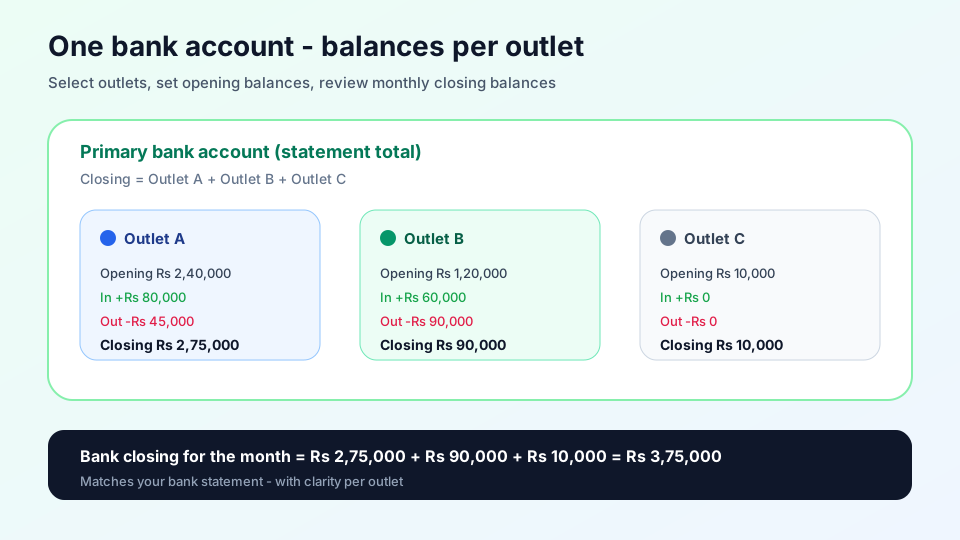
A bank statement shows one balance. If several outlets share that account, you still need:
- What was each outlet’s opening balance?
- What was each outlet’s closing balance today / this month?
How to use it
- Open Fund Treasury
- Select outlets and set each starting opening balance
- Switch Month or Day in the eagle-eye view
- Enter or adjust opening and closing per outlet → Save
- Click Check Cashflow on an outlet to see inflow, outflow, and net — copy any figure, or Fill closing from suggested closing (= opening + net)
- Export the current eagle-eye view as CSV or PDF
- Use Open Cashflow when you need to log detailed income/expense
Check Cashflow (per outlet)
When Cashflow is active, each eagle-eye row shows a compact net (with in/out). Open Check Cashflow for:
| Figure | Meaning |
|---|---|
| Inflow | Income for that outlet in the selected day/month |
| Outflow | Expenses for that outlet in the selected day/month |
| Net cashflow | Inflow − outflow |
| Suggested closing | Opening + net |
Copy any value to the clipboard, or fill the closing field without overwriting other outlets.
Export reports
From the eagle-eye toolbar:
- CSV — spreadsheet of per-outlet opening, closing, change, and Cashflow figures for the selected day or month
- PDF — printable Oflync report with bank totals and the same outlet rows
Exports always use the period and bank account currently selected on screen.
Worked example (month)
| Outlet | Opening | Cashflow net | Closing |
|---|---|---|---|
| Outlet A | ₹2,40,000 | +₹35,000 | ₹2,75,000 |
| Outlet B | ₹1,20,000 | −₹30,000 | ₹90,000 |
| Bank total | ₹3,60,000 | ₹3,65,000 |
Cashflow holds the individual sales and expenses that produced those nets. Treasury only stores the period balances.
Tips
- Previous period’s closing becomes the next period’s default opening
- Compare bank closing (sum of outlets) to your real bank statement
- Activate Cashflow if you want inflow / outflow / net on each outlet
- Use Check Cashflow → Fill closing when you want suggested closing for one outlet only
Common questions
Why not record in/out here?
That duplicates Cashflow. Treasury is only for opening/closing balances.
Do I need Cashflow?
No for manual balances. Yes if you want to inspect and copy period cashflow figures per outlet.
Daily and monthly?
Yes — toggle Day / Month in the eagle-eye view.